This one will be quick and easy. Recently I found out about wonderful feature of Marlin 3D printer firmware (öffnet in einem neuen Fenster) called firmware retraction. So what is the difference between firmware retraction and normal retraction made by Slic3r (öffnet in einem neuen Fenster)? It is easy, you can set different speeds for retract and recover.
Basically you can pull out the plastic really fast and save time but you can’t try to force the filament back in as fast as it would cause many problems.
When the recover speed is too big, you risk filament drive stripping piece of the filament and cause jam. Also there is a slight lag between the filament actually flowing out of the extruder nozzle, especially with bowden extruder setup. Newest Slic3r (tested with 1.2.6) has support for firmware retraction so you can easily try it out.
And it has one more GIANT advantage. You can tweak your retract during the print with simple G-code commands. That means no need to reslice the model just to tweak it! I love this!
First and foremost you have to have it enabled during compilation of your firmware. This might be a problem if you bought fully built printer with no support from china, but don’t worry I am writing a guide how to setup and compile a firmware for your printer too 😉 BTW I finally started selling my printers online, took me 3 years to get it right and FW retraction is enabled 😉 Check it out here (öffnet in einem neuen Fenster).
When you are setting up the Marlin FW for compilation there is you can find the settings in Configuration_adv.h.
Uncomment
// #define FWRETRACT //ONLY PARTIALLY TESTED
so you will end up with
#define FWRETRACT //ONLY PARTIALLY TESTED
You don’t have to worry about the other settings too much as we will be setting them via G-code later. Now just reflash your board and move on to Slic3r settings.
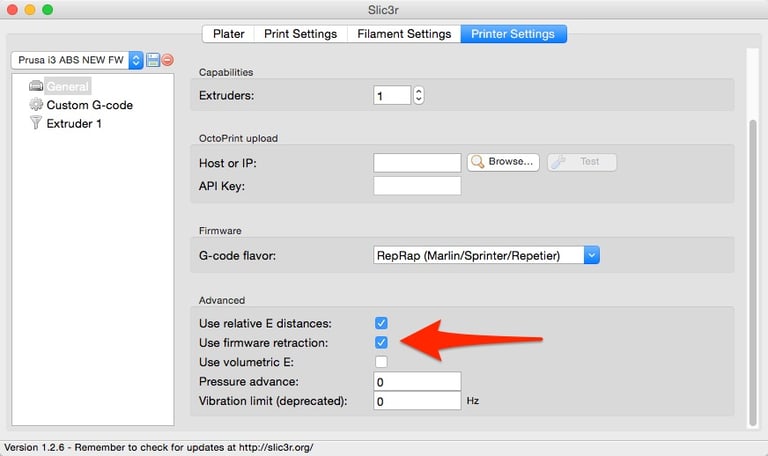
First you need to go to Printer Settings -> General and enable “Use firmware retraction” checkbox.
Now move to Custom G-code tab and modify the Start G-code.
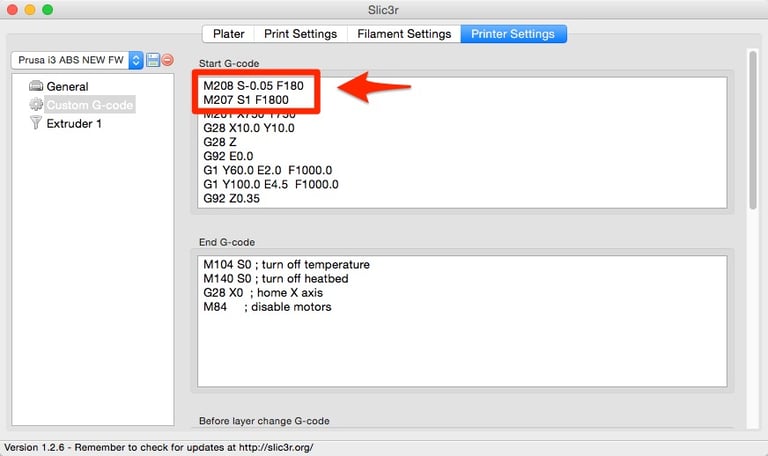
Here is what I added to the beginning.
M208 S-0.05 F180
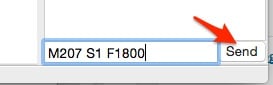
M207 S1 F1800
M208 is setting for extrusion recover length and speed. In my case I tend to recover -0.05mm less as it prevents creating a small blob on the place where filament starts flowing and speed is 3mm/s.
M207 is retraction settings. I retract 1mm at speed of 30mm/s.
You can modify these setting even during your print and find the best settings for your nozzle and plastic you are using, how awesome is that!! It is really easy in Pronterface! Let me know your settings in our Forums please 😉 (öffnet in einem neuen Fenster)